Application Details
This document provides an overview of the Application Details functionality, enabling users to review backend-specific configurations, including database or cache connections, server resource usage, and other important application metadata.
The purpose of the Application Details section is to expose the inner workings of the application in terms of infrastructure. Users can check whether a database or cache connection is active. and can view server performance metrics such as CPU usage and memory usage. All these details are beneficial for system and application users and developers interested in knowing about application stability and performance.
Accessing Application Details
-
Go to the Login > About > Application Details.
-
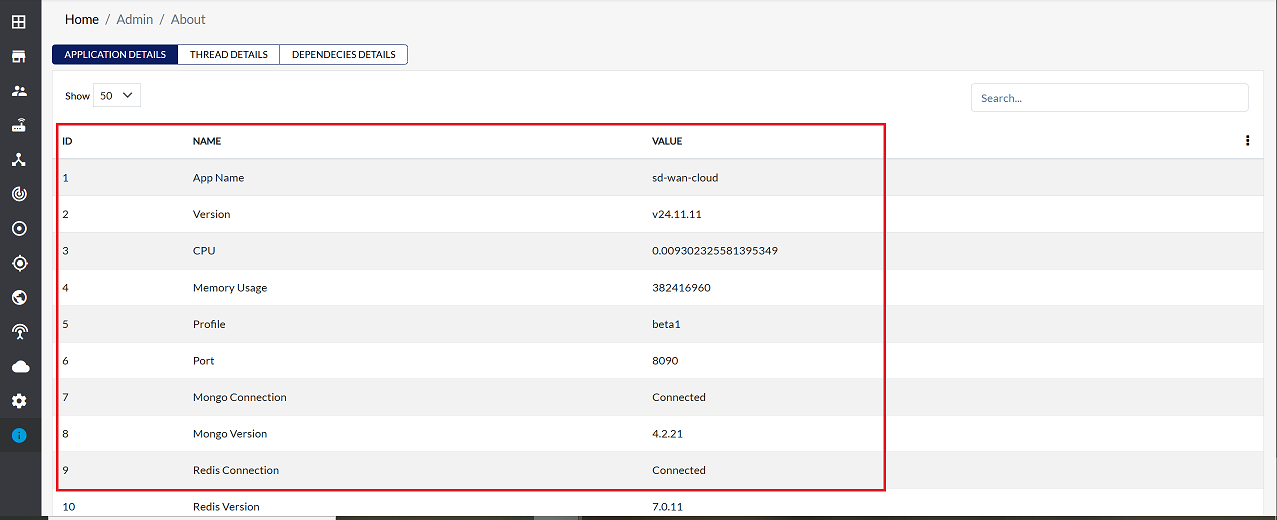
This section presents backend-related information in a structured format, including fields such as ID, Name, and Value, as illustrated.
Important Notes for Users
- The information displayed is system-generated and cannot be edited by users.
- Details shown here are for monitoring and reference purposes only.
- If any connection (e.g., database or cache) shows inactive status, contact the system administrator or support team.
- High CPU or memory usage values may indicate performance issues.
- Only authorized users should access this section due to sensitive infrastructure details.
- Do not share screenshots externally unless approved, as backend metadata may be confidential.
FAQs
Q:1 How can I troubleshoot issues using this section?
Ans: Use the displayed details to verify active connections to the database or cache, and monitor server resource usage. This information can help identify potential performance bottlenecks or connectivity issues.