Local Loop
The Local Loop is a virtual interface on the CE (Customer Edge) device that provides a stable, non-physical IP address for consistent identification. When CGW (Cloud Gateway) is enabled, it automatically assigns a public IP to the CE. If the CE lacks a public IP on its WAN interface, this public IP is mapped to the Local Loop interface. Because the loopback interface remains active regardless of physical link status, it ensures reliable connectivity. All internet and cloud-bound traffic uses this CGW-assigned public IP, allowing the CGW to centrally manage NAT and secure communication across sites.
Activation and Verification of the Local Loop
The Local Loop interface is automatically generated upon the enablement of the Cloud Gateway (CGW) feature.
Verification Path: To inspect the operational status of the Local Loop interface, navigate to: Login > CE Device > Interface > Local Loop
Status Conditions:
-
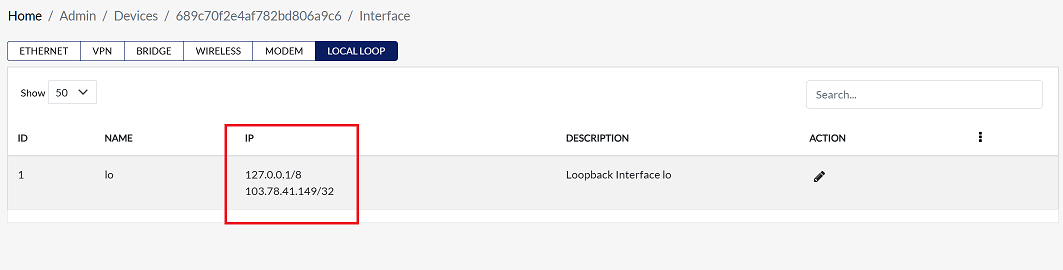
If the CGW feature is enabled, the Local Loop will display the assigned Customer Public IP address.
-
If the CGW feature is disabled, the IP Address field within the Local Loop interface configuration will appear empty, indicating that no address has been provisioned.
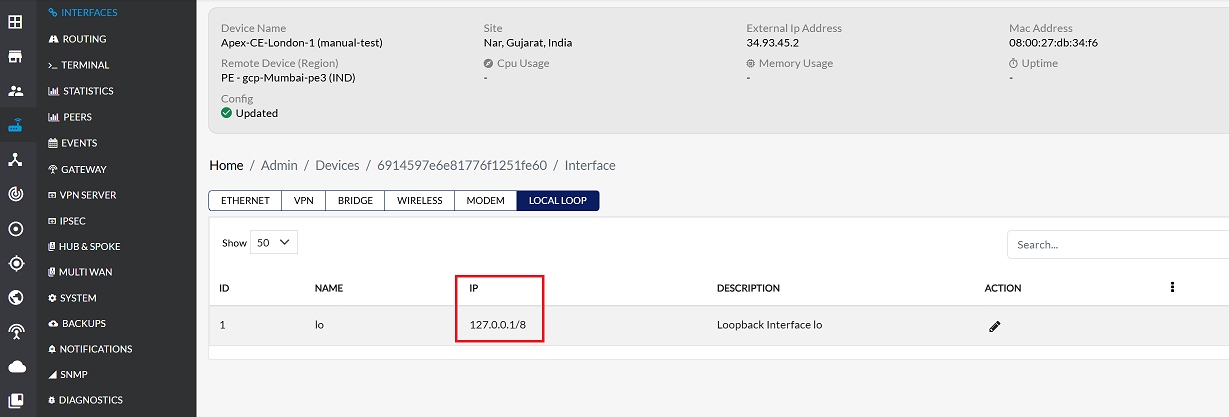
Local Loop IP Address Provisioning Process
The provisioning of the public IP address to the Local Loop interface is directly tied to the CGW configuration workflow:
- CGW Provisioning: Enable CGW documentation and select customer public IP from customer IP pool. Refer to the CGW documentation to enable CGW and select the customer public IP from the customer IP pool.
- After selecting the IP, click Save Config.
- Upon configuration commitment, the system autonomously assigns the selected Customer Public IP address to the Local Loop interface.
Without enabling CGW, the Local Loop IP address will not be generated.
Local Loop Operational Status
Following the successful execution of the CGW provisioning steps:
-
The Local Loop interface will reflect the assigned Customer Public IP.
-
Now, when navigating to: Login > CE Device > Interface > Local Loop
-
The assigned IP Address is displayed in the IP Address field.
Important Notes for Users
- The Local Loop interface is a virtual interface; it does not rely on any physical WAN link.
- Ensure CGW is enabled to provision the Local Loop IP; otherwise, no IP will appear.
- All internet and cloud traffic will route through the Local Loop IP once assigned.
- Any changes to the CGW configuration may update the Local Loop IP automatically.
- Do not attempt manual IP assignment on the Local Loop interface; it is managed centrally by CGW.