Peers
The Peers feature displays the live and historical connection data between devices. The Peers section provides a visual and statistical overview of the connection status between CE device and its associated peer devices, such as PE links and other Spoke devices.
It helps administrators quickly identify when connections were established or disconnected and provides network performance information such as latency (in milliseconds) and packet loss (in percentage).
Each data point on the graph indicates:
- Date and Time of the connection event
- Latency: Network delay measured in milliseconds
- Loss: Packet loss percentage
- Status: Connection state (Connected or Disconnected)
The connection status is color-coded for quick identification:
- Connected: Indicates an active and healthy connection
- Disconnected: Indicates that the peer connection is down
Accesing Peers
Follow the steps below to access the Peers module
- Go to the Login > CE device > Select CE device > Peers.
This opens the peer monitoring graph for the selected CE device.
Time Range Analysis
The Peers page includes multiple time range filters on the top-right side of the graph. Peer connection history can be viewed based on the selected duration. Available time range options include: 1 Hour, 3 Hours, 6 Hours, 12 Hours, 1 Day, 1 Week, 1 Month, 3 Months, 6 Months, 1 Year.
- For example:- If 1 Hour is selected, the graph displays all connection activities that occurred within the last hour.
Graph Interpretation
The graph provides a clear timeline view of peer connection events.
- X-axis: Represents Time (Date and Time)
- Y-axis: Represents Latency (Milliseconds)
Each plotted point shows:
- Device Name
- Latency (in ms)
- Loss (in %)
- Status (Connected/Disconnected)
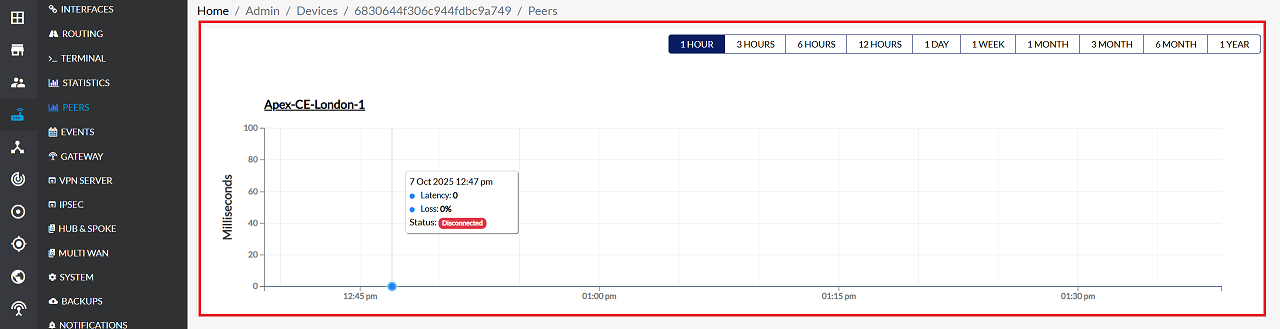
When the cursor hovers over a data point, a tooltip appears showing these details.
-
As shown in the reference image: For the device “Apex-CE-London-1”, the details include:
- Latency: 0 ms
- Loss: 0%
- Status: Disconnected (displayed with a red background)
Important Notes for Users
- A Disconnected status does not always mean device failure — it may be due to maintenance, link flaps, or temporary outages.
- High latency or packet loss may impact application performance. Monitor trends instead of single spikes.
- The Peers graph shows historical data — this helps diagnose past issues, not just real-time events.
- Time-range filters may change the number of visible events. If data seems missing, try expanding the range.
- Ensure you have the required permissions to view device-level analytics.
- If no data is visible, verify:
- The CE device is online
- Monitoring is enabled
- The selected time-range contains activity
- Use the tooltip for accurate details rather than relying only on graph colors.
- If frequent disconnections are observed, report the issue to network support.
FAQs
Q:1 What is the main purpose of the Peers feature?
The main purpose of the Peers feature is to provide a live and historical view of connectivity between a CE device and its associated peer devices. It helps administrators quickly understand: When connections were established or disconnected, How stable the link is over time, Key performance indicators such as latency and packet loss. This makes it easier to diagnose link issues, monitor network health, and ensure reliable communication between CE, PE, and Spoke devices.
Q:2 What does the tooltip on the graph show?
When you hover over any data point on the graph, the tooltip displays detailed information for that specific moment, including: Device Name, Latency (ms), Packet Loss (%), Connection Status (Connected or Disconnected), Exact Date and Time of the event. This allows administrators to inspect precise connection behavior at any point in the timeline.
Q:3 Is the Peers feature updated in real-time?
Is the Peers feature updated in real-time? Yes. The Peers feature updates continuously as the CE device exchanges connectivity information with its peers. This ensures that: Connection status changes appear immediately, Latency and loss values reflect current network conditions, Administrators can monitor link health without delay, Real‑time updates make the Peers module a reliable tool for ongoing network monitoring.