Exporting User Details
This document outlines the steps to export user details from the system, which can then be viewed in an Excel spreadsheet.
Steps to Export User Data
Follow these instructions to download the user data:
-
Log In: Navigate to the Login page and sign in to the account.
-
Access User Section: From the main dashboard, go to the User section.
-
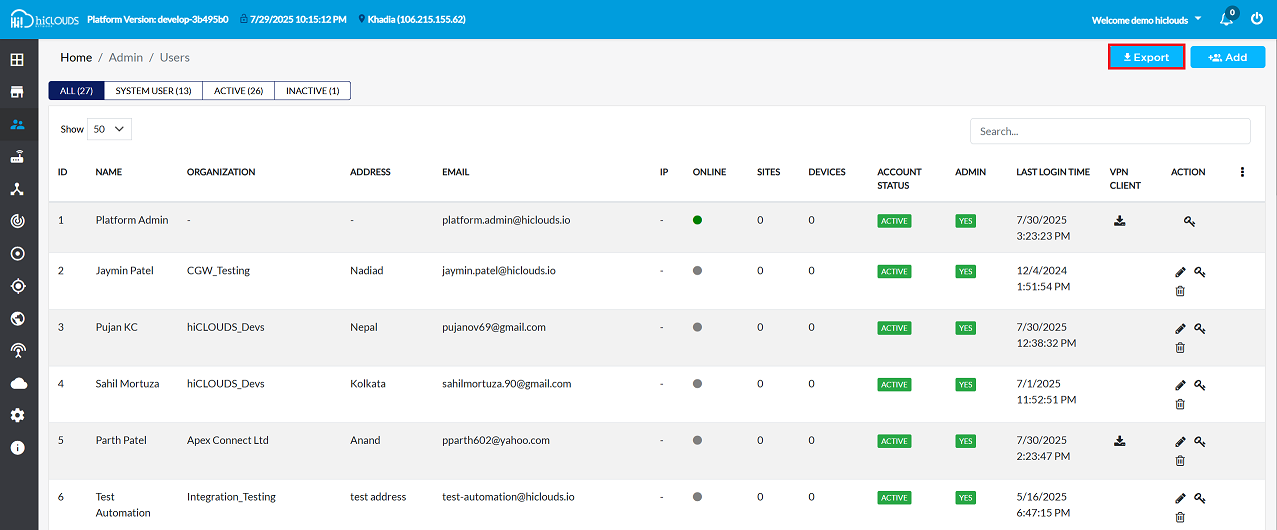
Initiate Export: Locate and click the Export button.
- As shown in the figure, the Export button is typically found in the upper-right corner of the screen. Clicking this will immediately start the download of the User data file.
-
Locate Downloaded File: Once the download is complete, open the file explorer and navigate to the Downloads folder (typically
This PC > Downloads). -
Open Excel File: Find and open the exported file. It will be an Excel spreadsheet (
.xlsxor.xlsformat).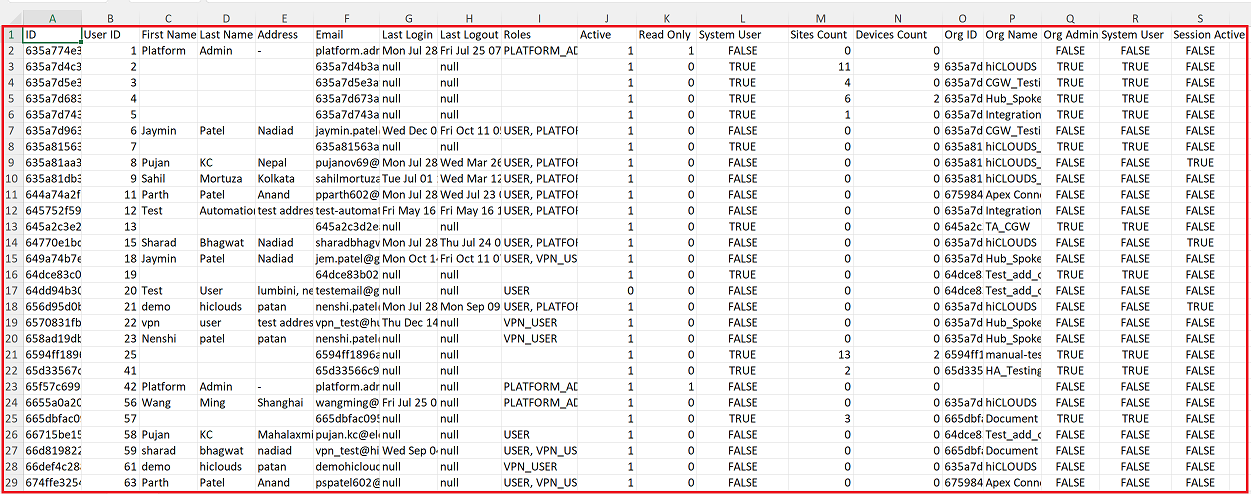
Understanding the Exported Data
The exported Excel file will contain a comprehensive list of all users, with details organized into the following columns:
| Column Header | Description |
|---|---|
| ID | A unique internal identifier for the user. |
| User ID | A system-assigned user ID. |
| First Name | The first name of the user. |
| Last Name | The last name of the user. |
| Address | The physical address of the user. |
| The email address of the user. | |
| Last Login | The timestamp of the user's last successful login. |
| Last Logout | The timestamp of the user's last logout. |
| Roles | The roles assigned to the user (e.g., PLATFORM_ADMIN, USER, VPN_USER). |
| Active | Indicates whether the user account is currently active (1 for active, 0 for inactive). |
| Read Only | Indicates if the user has read-only access (1 for true, 0 for false). |
| System User | Indicates if the user is a system user (TRUE/FALSE). |
| Sites Count | The number of sites associated with the user. |
| Devices Count | The number of devices associated with the user. |
| Org ID | The unique identifier of the organization the user belongs to. |
| Org Name | The name of the organization the user belongs to. |
| Org Admin | Indicates if the user is an administrator for their organization (TRUE/FALSE). |
| Session Active | Indicates if the user currently has an active session (TRUE/FALSE). |
Example Data
Below is a sample of the data found in the exported Excel sheet.
| ID | User ID | First Name | Last Name | Address | Last Login | Last Logout | Roles | Active | Read Only | System User | Sites Count | Devices Count | Org ID | Org Name | Org Admin | System User | Session Active | |
|---|---|---|---|---|---|---|---|---|---|---|---|---|---|---|---|---|---|---|
635a774e3afb390024124aab | 1 | Platform | Admin | - | platform.admin@hiclouds.io | Mon Jul 28 13:26:22 UTC 2025 | Fri Jul 25 07:14:40 UTC 2025 | PLATFORM_ADMIN, USER, VPN_USER | 1 | 1 | FALSE | 0 | 0 | FALSE | FALSE | FALSE | ||
635a7d963afb390024124ae2 | 6 | Jaymin | Patel | Nadiad | jaymin.patel@hiclouds.io | Wed Dec 04 08:21:54 UTC 2024 | Fri Oct 11 05:13:04 UTC 2024 | USER, PLATFORM_ADMIN | 1 | 0 | FALSE | 0 | 0 | 635a7d5e3afb390024124adb | CGW_Testing | FALSE | FALSE | FALSE |
635a81aa3afb390024124b61 | 8 | Pujan | KC | Nepal | pujanov69@gmail.com | Mon Jul 28 14:37:54 UTC 2025 | Wed Mar 26 11:32:54 UTC 2025 | USER, PLATFORM_ADMIN | 1 | 0 | FALSE | 0 | 0 | 635a81563afb390024124b48 | hiCLOUDS_Devs | FALSE | FALSE | TRUE |
644a74a2fe2b5d4d5d74b79b | 11 | Parth | Patel | Anand | pparth602@yahoo.com | Mon Jul 28 12:48:08 UTC 2025 | Wed Jul 23 03:15:40 UTC 2025 | USER, PLATFORM_ADMIN, VPN_USER | 1 | 0 | FALSE | 0 | 0 | 675984fc32d6a273273f0fb9 | Apex Connect Ltd | FALSE | FALSE | FALSE |
64770e1bdd298f09c4d908d9 | 15 | Sharad | Bhagwat | Nadiad | sharadbhagwat121@gmail.com | Mon Jul 28 14:16:02 UTC 2025 | Thu Jul 24 09:28:18 UTC 2025 | USER, PLATFORM_ADMIN | 1 | 0 | FALSE | 0 | 0 | 635a7d4b3afb390024124ad7 | hiCLOUDS | FALSE | FALSE | TRUE |
656d95d0b8a6353e30a21e7a | 21 | demo | hiclouds | patan | nenshi.patel@elemprin.com | Mon Jul 28 14:52:30 UTC 2025 | Mon Sep 09 10:35:41 UTC 2024 | USER, PLATFORM_ADMIN, VPN_USER | 1 | 0 | FALSE | 0 | 0 | 635a7d4b3afb390024124ad7 | hiCLOUDS | FALSE | FALSE | TRUE |
6655a0a20952062fa61084e3 | 56 | Wang | Ming | Shanghai | wangming@hiclouds.io | Fri Jul 25 09:11:30 UTC 2025 | null | PLATFORM_ADMIN | 1 | 0 | FALSE | 0 | 0 | 635a7d4b3afb390024124ad7 | hiCLOUDS | FALSE | FALSE | FALSE |
68130b8d10fac36d5f9d06d1 | 79 | Zeel | Patel | Surat | zeel.patel@grovetech.in | Mon Jul 28 13:05:10 UTC 2025 | Thu Jul 24 05:28:29 UTC 2025 | PLATFORM_ADMIN | 1 | 0 | FALSE | 0 | 0 | 635a7d4b3afb390024124ad7 | hiCLOUDS | FALSE | FALSE | FALSE |
68652431287cb854d345e434 | 96 | Priyanshi | Sakhavala | Ahmedabad | priyanshi.sakhavala@grovetech.in | Mon Jul 28 09:46:37 UTC 2025 | Thu Jul 03 11:06:25 UTC 2025 | USER, PLATFORM_ADMIN | 1 | 0 | FALSE | 0 | 0 | 635a81563afb390024124b48 | hiCLOUDS_Devs | FALSE | FALSE | FALSE |
Important Notes for Users
- The exported data file contains only the information permitted based on the assigned role.
- If the downloaded file appears empty or incomplete, ensure that the necessary export permissions are assigned by the administrator.
- The exported Excel file is read-only and does not affect system data when edited. Any changes made locally will not sync back to the system.
- The Last Login and Last Logout timestamps depend on the user’s activity. If a value is shown as null, it means no activity has been recorded for that field.
- Ensure that Excel or another spreadsheet viewer is installed on the system to open .xlsx files.
- Exported data may include system users, which are internal accounts used for automation or backend tasks. These are not regular platform users.
- Always handle exported data carefully, as it may contain sensitive information like email addresses and user identifiers.
- Export operations may take time if the number of users is large. Avoid clicking the Export button multiple times.
- If the export download does not start, check browser settings to confirm that file downloads are allowed.
FAQs
Q-1: What file format is the exported data in?
The exported data is in a spreadsheet format, typically .xlsx or .xls, which can be opened with Microsoft Excel or similar spreadsheet software.
Q-2: Does the exported file contain all users, or only those I can see?
The exported file contains only the information you have permission to view based on your assigned role in the system.
Q-3: What does a "null" value mean in a column like "Last Logout"?
A "null" value means that no activity has been recorded for that specific field. For instance, a "Last Logout" of null indicates the system has not recorded a formal logout for that user.
Q-4: What do the values 1 and 0 mean in the Active and Read Only columns?
These columns use binary values to indicate status: 1 means TRUE (Active account, Read-Only access). 0 means FALSE (Inactive account, Full/Write access).