Ali
This guide provides step-by-step instructions for creating a CE instance on AliCloud. The process has been simplified for ease of understanding while maintaining technical accuracy. Please follow each step to make sure it's successful.
Creating CE Instance
-
Visit the AliCloud login page.
-
Enter your username and password, then click Login.
-
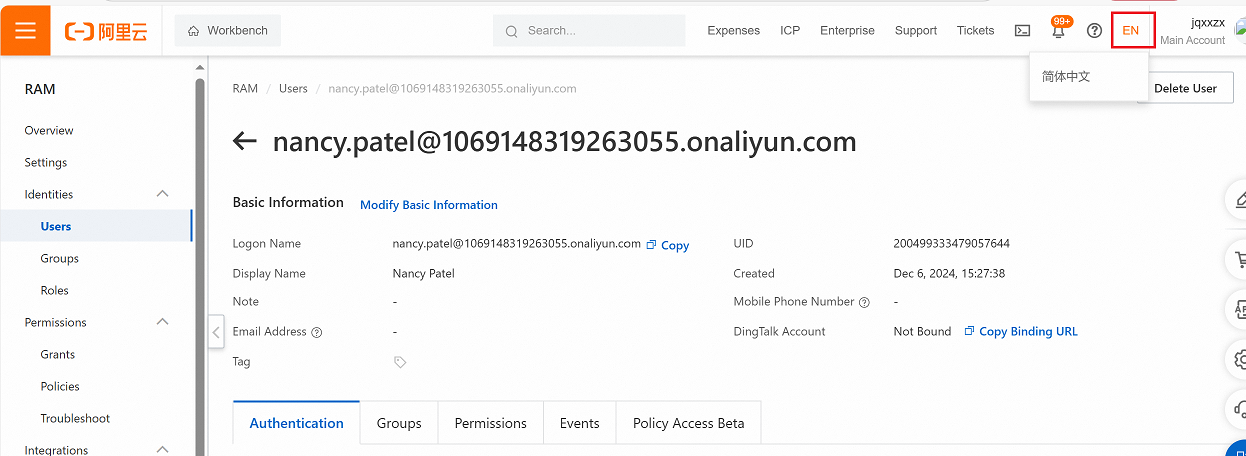
Change the language if needed by navigating to the language settings as shown in the interface.
-
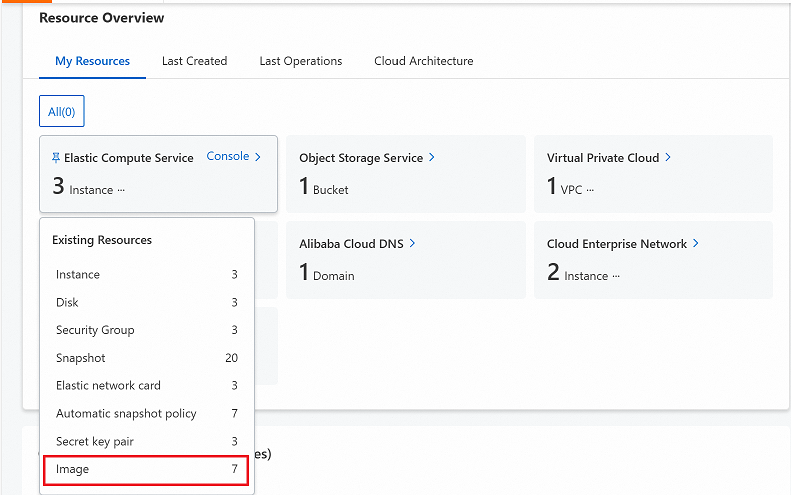
Go to Overview > My Resources > Elastic Compute Service.
-
Click on Image to proceed.
-
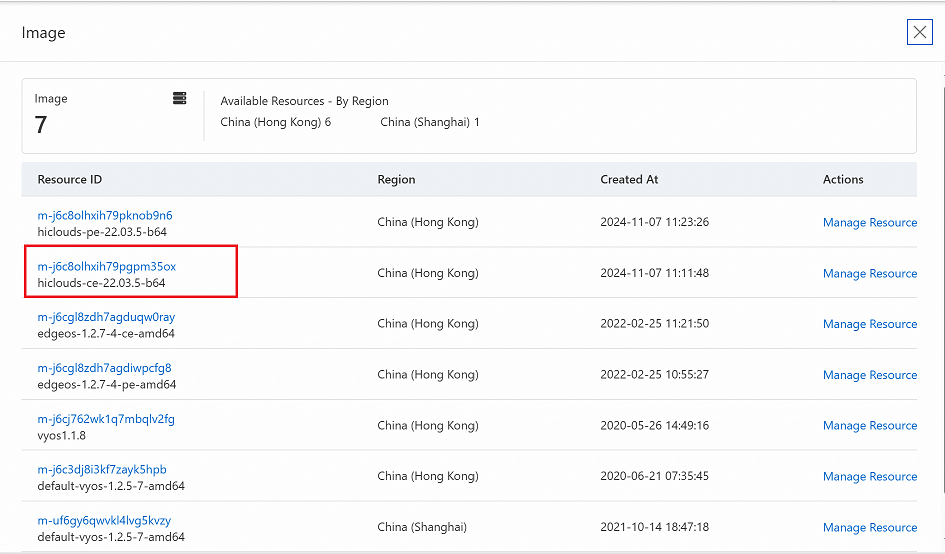
Locate and select the Resource ID of your desired resource.
-
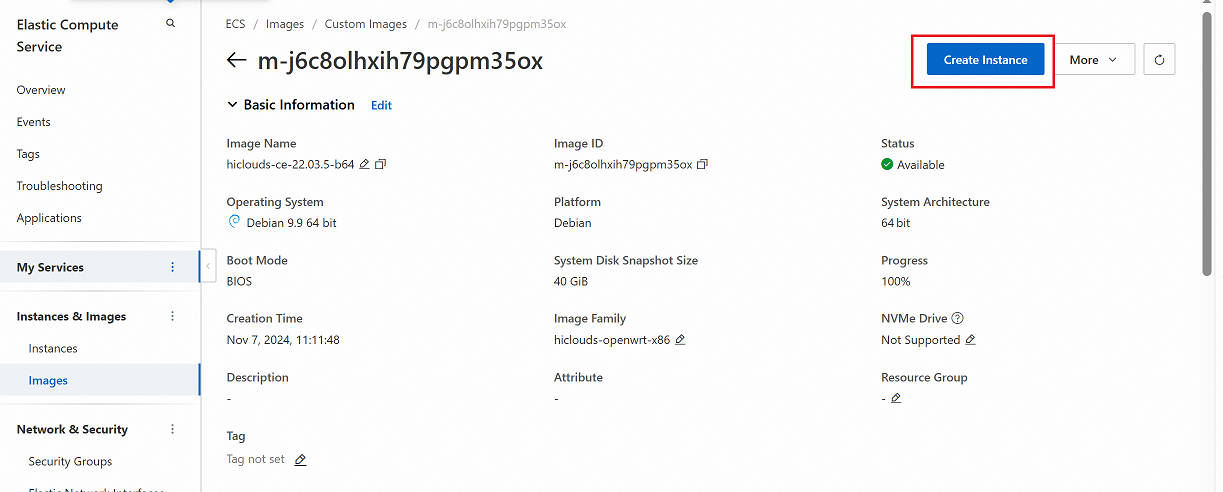
Click the Create Instance button.
-
A new tab will open with the configuration page. Fill in the required details as follows:
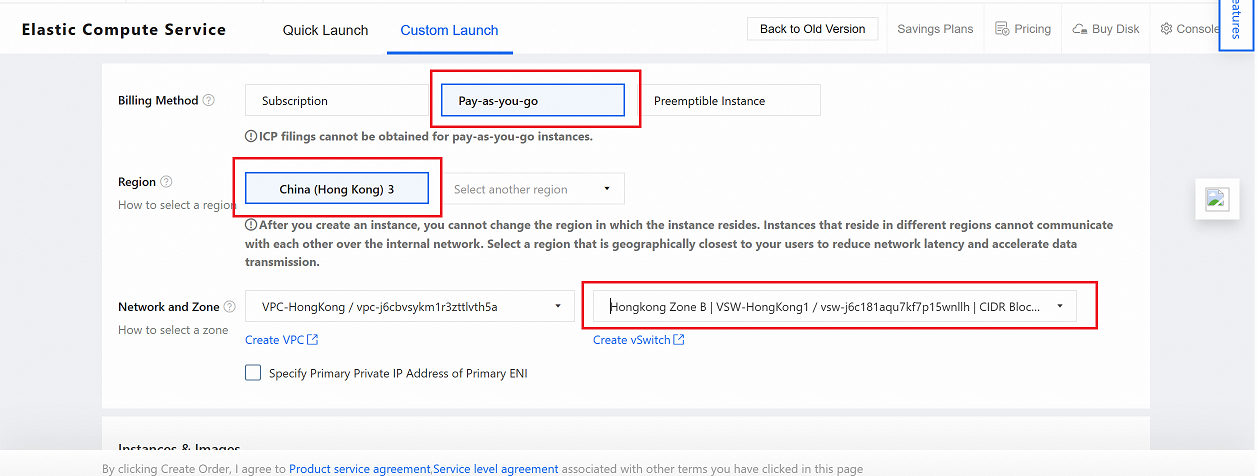
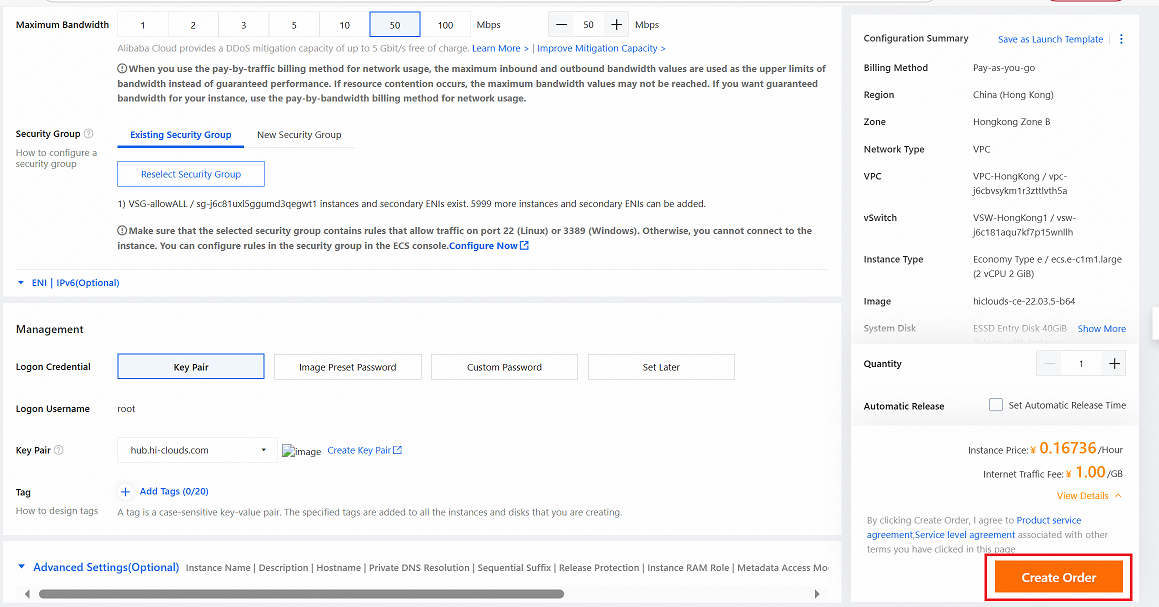
Billing Method: Choose between Subscription or Pay-as-you-go based on your preference.
Region: Select the region where the instance will be deployed (i.e., China (Hong Kong)3).
Network and Zone: Choose the appropriate Zone for the selected region (i.e., HongKong Zone B).vpc&vswitch-notesIf there are no existing VPCs or vSwitches in the selected region and zone on Alibaba Cloud, they must be created during the initial setup process. Ensure these are configured according to your network architecture plan to guarantee optimal resource allocation and seamless connectivity. To proceed, Create VPC and then Create vSwitch. Once completed, click to confirm the setup.
-
Bandwidth & Security Group Settings
Public IP Address: Enable the Public IP Address checkbox.
Line Type: By default, BGP (Multi-ISP) will be selected.
Bandwidth Billing Method:Select Pay-by-Traffic.
Maximum Bandwidth: Specify the maximum bandwidth limit (i.e., 50 Mbps).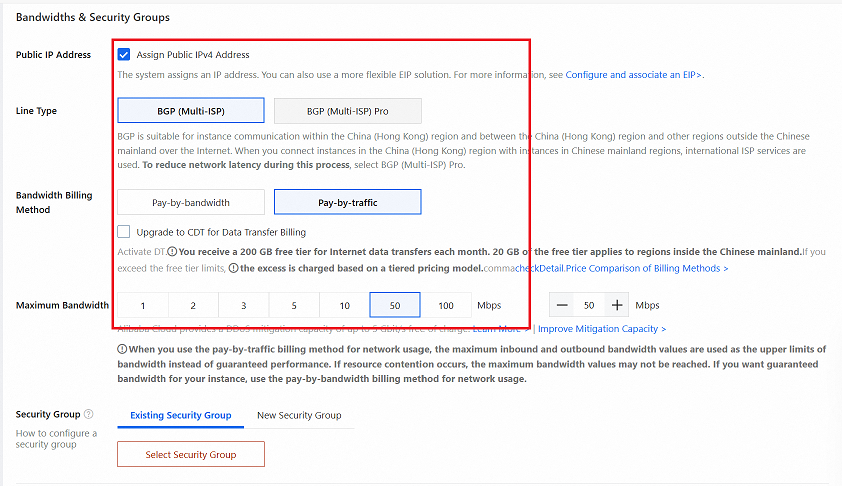
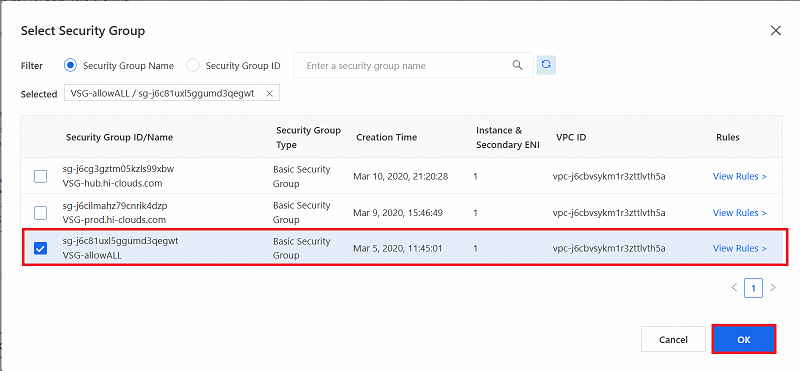
Security Group: Click Select Security Group, choose the desired group from the list, and click OK button.
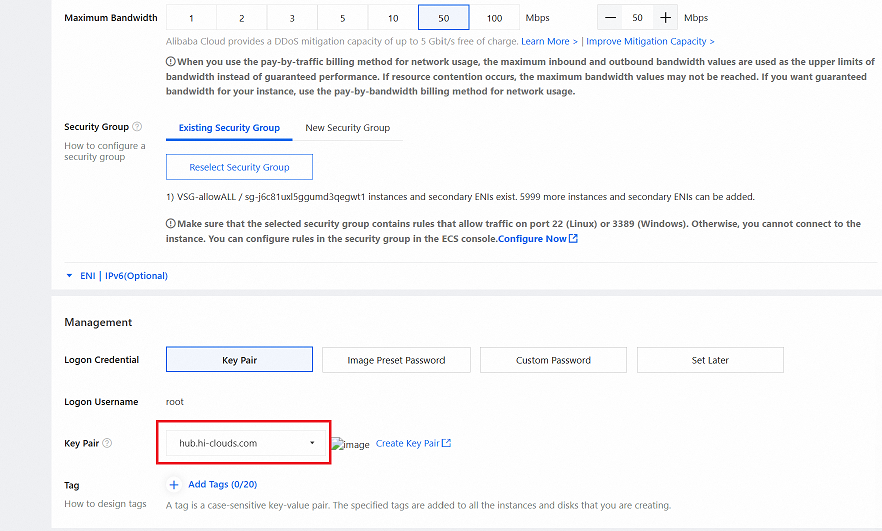
Key Pair: Select the Key Pair for secure access. (i.e:- hub.hi-clouds.com)
-
Review the configuration and click Create Order button.
-
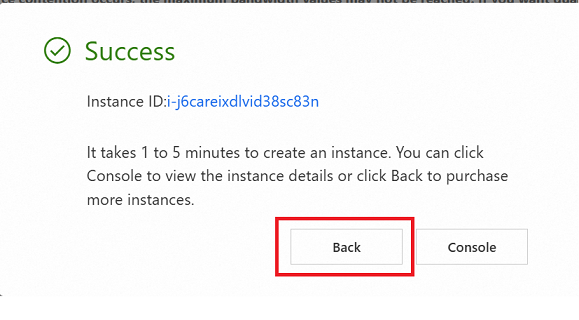
Upon successful order creation, a confirmation message will appear.
-
Click Back to return to the Elastic Compute Service dashboard.
Verify the CE Instance
-
Navigate to the Instances tab on the platform to retrieve the public IP address of the newly created instance.
-
Use the public IP address to establish an SSH connection to the instance. Once connected, check the MAC address of the eth0 network interface.
-
With the above steps completed, proceed to verify the CE on the hiCLOUDS platform.
-
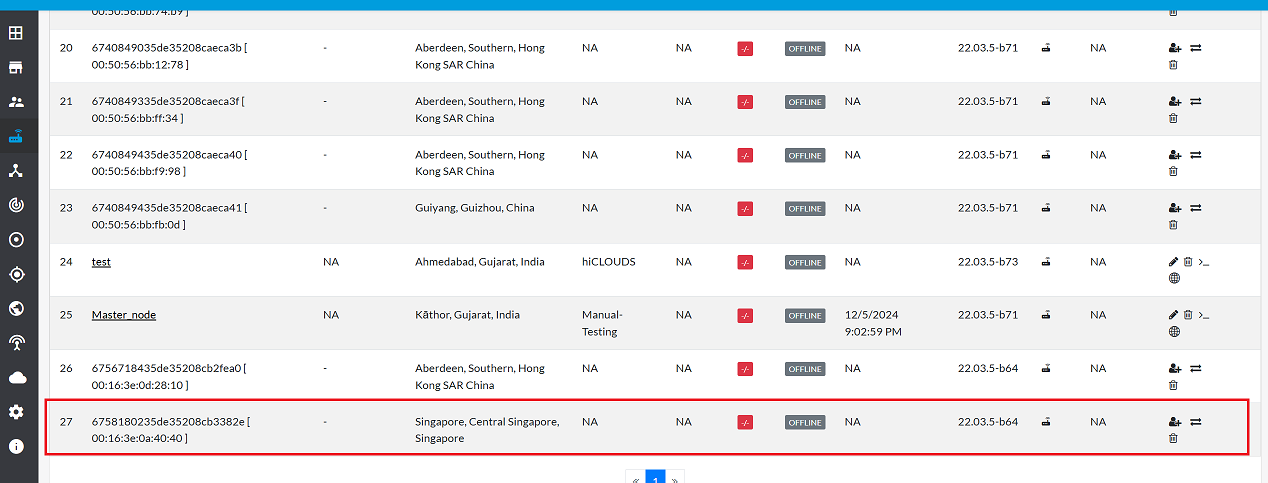
Navigate to login > CE Devices > ALL.
-
Verify that the newly created CE Instance appears in the list.
Important Notes for Users
- Check Region & Zone Carefully
Always ensure that the selected Region and Zone match your deployment plan. Incorrect selection may lead to latency issues or resource unavailability. - Create VPC & vSwitch (If Not Available) If no VPC or vSwitch exists in the selected region, create them during setup. This is required for successful instance deployment.
- Enable Public IP if Remote Access is Needed
Make sure the Public IP Address option is enabled. Without it, the CE instance cannot be accessed from the internet. - Choose Correct Bandwidth Plan
Select Pay-by-Traffic and configure sufficient Maximum Bandwidth to avoid performance limitations. - Security Group Rules Must Allow Access
Ensure that the selected Security Group allows required inbound traffic such as SSH (TCP 22), HTTPS (TCP 443), or other necessary service ports. - Key Pair is Mandatory for Secure Login
You must select a valid Key Pair during instance setup. Without it, you will NOT be able to log in. - Review Before Order Creation
Double-check all configuration details before clicking Create Order to avoid deployment errors. - Billing Charges Apply
Depending on Subscription or Pay-as-you-go, charges will be applied as per AliCloud billing policy. - Instance Verification Required
After deployment, verify the instance in the hiCLOUDS Platform → CE Devices to confirm successful provisioning. - Deleted or Terminated Instances Cannot Be Recovered
Removing the instance from AliCloud will permanently delete it.
FAQs
Q:1 In a cloud CE setup with only one eth0 interface, does the base function and feature work correctly?
Ans: Yes, it operates effectively. The CE has two logical ports: one connected to the VPC (LAN network) and the other linked to the internet, which is assigned a public IP address. This configuration ensures the base functionality and features perform as expected.
Q:2 How to create instance on customer ali cloud?
Ans: To create an instance on a customer's Ali Cloud, first, download the required image to your local system. Then, upload the image to the customer's Ali Cloud environment to proceed with instance creation.