Exporting the Task Report
This document outlines the steps to export the device diagnostics Task Report data from the management interface to an Excel file.
Steps to Export Task Report Data
Follow these instructions to download the Task Report Data:
-
Go to the Login > CE Device > [Select CE Device] > Diagnostics > Task Report > Export.
-
Locate and click the Export button.
-
Clicking this button will initiate the download of the Task Report data.
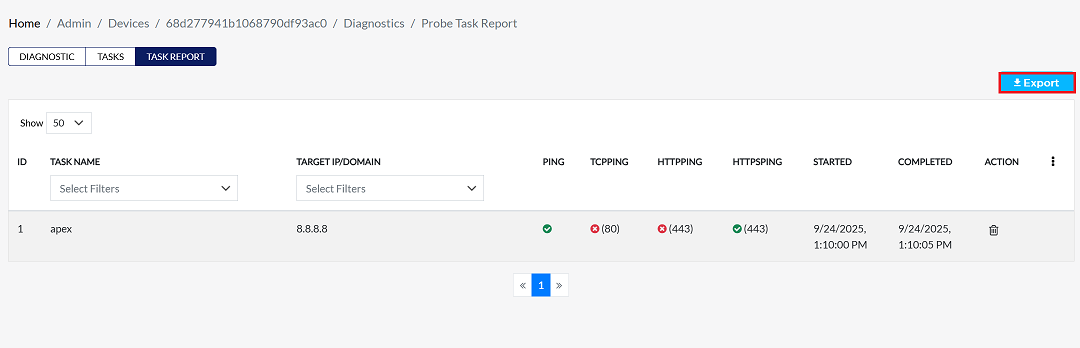
-
-
Once the download is complete, open the file explorer and navigate to the Downloads folder (typically This
PC > Downloads) -
Find and open the exported file. It will be an Excel spreadsheet (
.xlsx or .xlsformat)
Understanding the Exported Data
The Excel file contains detailed results for each diagnostic test performed. The report uses the following columns to help you understand the results:
| Column Name | Description |
|---|---|
| Device ID | A unique identifier for the device that ran the task. |
| Device Label | A user-friendly name for the device (e.g., Apex-CE-London-1). |
| Organization Name | The name of the organization the device belongs to. |
| Device Type | The model or type of the device (e.g., ce). |
| Task ID | A unique identifier for the specific diagnostic task. |
| Task Name | The name of the task (e.g., apex). |
| Target | The destination the test was run against (e.g., an IP address like 8.8.8.8). |
| Task Type | The kind of diagnostic test performed (e.g., ping, httpping, tcpping). |
| Port | The specific network port used for the test, if applicable (e.g., 443 or 80). |
| Result | The outcome of the task: success or fail. |
| Executed At | The exact date and time the diagnostic task was run. |
Example data
| ID | Device Name | Task Name | Type | Task ID | Source | Target IP | Method | Port | Result | Timestamp |
|---|---|---|---|---|---|---|---|---|---|---|
| 68d277941b1068790df93ac0 | Apex-CE-London-1 | manual-test | ce | 823ea8118c074f5e9c255fb4077d45af | apex | 8.8.8.8 | ping | NA | success | 2025-09-24T13:10 |
| 68d277941b1068790df93ac0 | Apex-CE-London-1 | manual-test | ce | 823ea8118c074f5e9c255fb4077d45af | apex | 8.8.8.8 | httpping | 443 | fail | 2025-09-24T13:10 |
| 68d277941b1068790df93ac0 | Apex-CE-London-1 | manual-test | ce | 823ea8118c074f5e9c255fb4077d45af | apex | 8.8.8.8 | httpsping | 443 | success | 2025-09-24T13:10:01 |
| 68d277941b1068790df93ac0 | Apex-CE-London-1 | manual-test | ce | 823ea8118c074f5e9c255fb4077d45af | apex | 8.8.8.8 | tcpping | 80 | fail | 2025-09-24T13:10:02 |