Exporting PE Devices
This document outlines the steps to export PE (Provider Edge) device details from the system. The exported data will be available in an Excel spreadsheet for easy viewing and analysis.
Steps to Export PE Device Data
Follow these instructions to download the PE device data:
-
Log In: Navigate to the Login page and sign in to the account.
-
Access PE Devices: From the main dashboard, go to the PE Devices section.
-
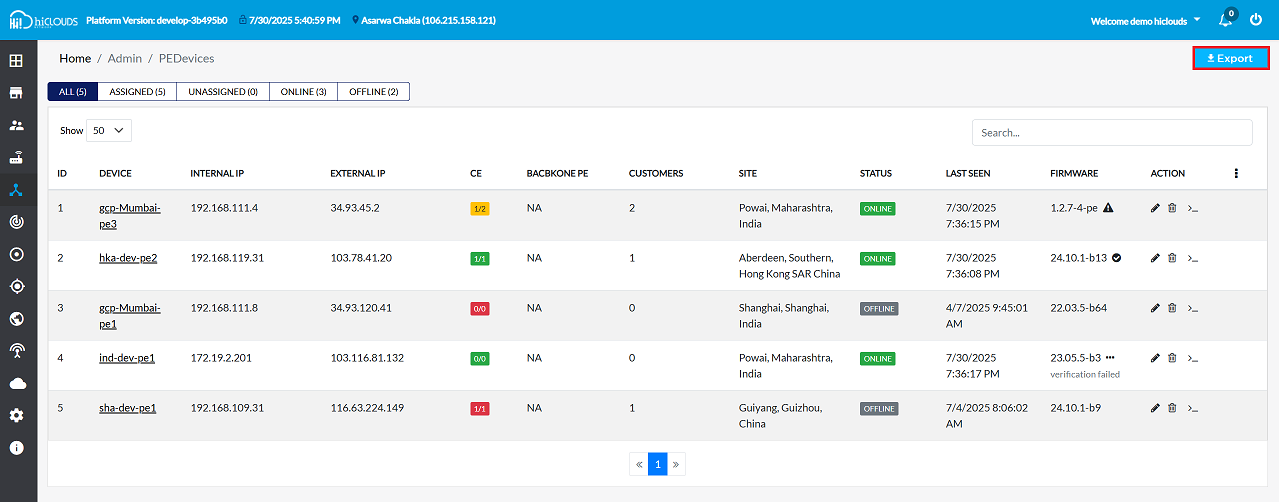
Initiate Export: Locate and click the Export button.
- As shown in the figure, the Export button is typically found in the upper-right corner of the screen. Clicking this will immediately start the download of the CE device data file.
-
Locate Downloaded File: Once the download is complete, open the file explorer and navigate to the Downloads folder (typically
This PC > Downloads). -
Open Excel File: Find and open the exported file. It will be an Excel spreadsheet (
.xlsxor.xlsformat).
Understanding the Exported Data
The exported Excel file will contain a comprehensive list of all PE devices, with details organized into the following columns:
| Column Header | Description |
|---|---|
| Device ID | A unique identifier for each PE device. |
| Device Label | A user-defined label or name for the device. |
| Firmware Version | The current firmware version running on the device. |
| Firmware Status | The current status of the device's firmware (e.g., "Up to date", "Update available", "Upgrading"). |
| MAC Address | The Media Access Control address of the device. |
| Internal IP | The internal IP address of the device. |
| Device IP | The primary IP address used by the device. |
| External IP | The external IP address of the device, if applicable. |
| Site | The physical location or site where the device is deployed. |
| Created At | The timestamp indicating when the device entry was created in the system. |
| Last Seen At | The timestamp of the last time the device was online and communicated with the system. |
| Is Online | Indicates whether the device is currently online (TRUE/FALSE). |
| CE Count | The total number of Customer Edge (CE) devices connected to this PE device. |
| Online CE Count | The number of currently online CE devices connected to this PE device. |
| Total Customers | The total number of customers associated with this PE device. |
Example Data
Below is a sample of the data found in the exported Excel sheet.
| Device ID | Device Label | Firmware Version | Firmware Status | MAC Address | Internal IP | Device IP | External IP | Site | Created At | Last Seen At | Is Online | CE Count | Online CE Count | Total Customers |
|---|---|---|---|---|---|---|---|---|---|---|---|---|---|---|
64ffe9efbb6b4c6b04395e82 | gcp-Mumbai-pe3 | 1.2.7-4-pe | Update available | 42:01:c0:a8:6f:04 | 192.168.111.4 | 34.93.45.2 | 34.93.45.2 | Powai, Maharashtra, India | Tue Sep 12 04:32:47 UTC 2023 | Tue Jul 29 16:59:46 UTC 2025 | TRUE | 2 | 0 | 2 |
65190fbb9ebbe46476e7b19a | hka-dev-pe2 | 24.10.1-b13 | Up to date | 00:50:56:bb:9e:e9 | 192.168.119.31 | 103.78.41.20 | 103.78.41.6 | Aberdeen, Southern, Hong Kong SAR China | Sun Oct 01 06:20:43 UTC 2023 | Tue Jul 29 16:59:44 UTC 2025 | TRUE | 1 | 1 | 1 |
651d569751e0666e6f495eeb | gcp-Mumbai-pe1 | 22.03.5-b64 | - | 42:01:c0:a8:6f:08 | 192.168.111.8 | 34.93.120.41 | 34.93.120.41 | Shanghai, Shanghai, India | Wed Oct 04 12:12:07 UTC 2023 | Mon Apr 07 04:15:01 UTC 2025 | FALSE | 0 | 0 | 0 |
672204acdf917120a70bf1f4 | ind-dev-pe1 | 23.05.5-b3 | Upgrading | 00:0c:29:d1:9a:65 | 172.19.2.201 | 103.116.81.132 | 103.116.81.131 | Powai, Maharashtra, India | Wed Oct 30 10:04:28 UTC 2024 | Tue Jul 29 16:59:38 UTC 2025 | TRUE | 0 | 0 | 0 |
683fe8748b990c276507e83c | sha-dev-pe1 | 24.10.1-b9 | - | 00:50:56:bb:93:40 | 192.168.109.31 | 116.63.224.149 | 116.63.238.78 | Guiyang, Guizhou, China | Wed Jun 04 06:32:20 UTC 2025 | Fri Jul 04 02:36:02 UTC 2025 | FALSE | 1 | 1 | 1 |